Internal Scanning Agent
Scan web applications inside your private network with the same DAST capabilities as external scanning. The Internal Scanning Agent deploys in your infrastructure and identifies vulnerabilities in applications that aren’t exposed to the public internet.
What You Can Scan
- Internal APIs and microservices
- Admin panels and back-office applications
- Staging and pre-production environments
- Applications behind firewalls or VPNs
- On-premises legacy applications
How It Works
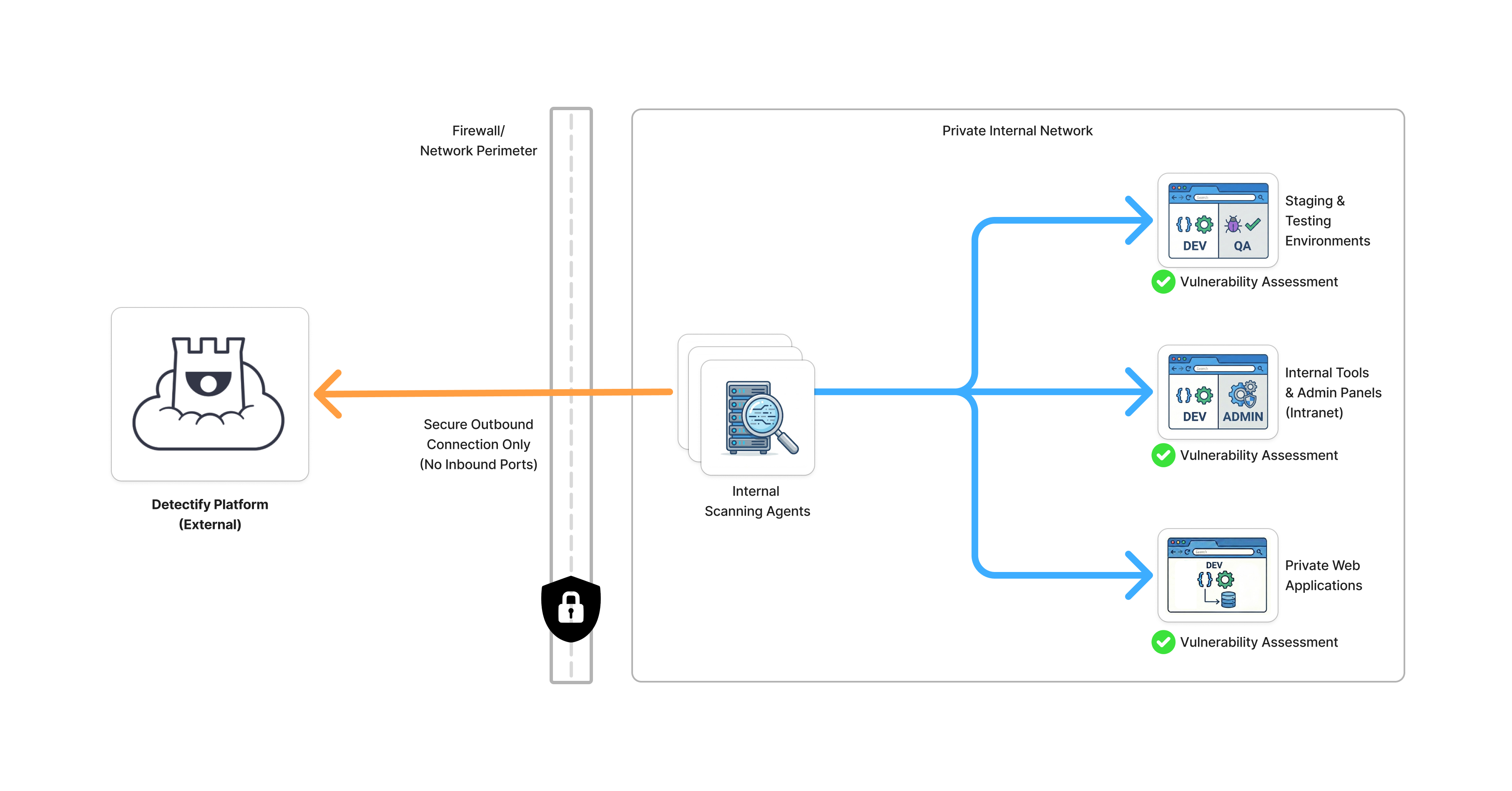
Click to enlarge
- Deploy the agent in your private network (AWS, Azure, GCP, or on-premises)
- Configure scan targets in the Detectify platform
- Scan - the agent scans your internal applications from within your network
- Review results in the Detectify dashboard alongside external scan findings
Choose Your Path
I’m evaluating this solution
For Security Leaders & AppSec Engineers
Understand what Internal Scanning does, how it fits into your security program, and what the security implications are.
- Use Cases - When to use internal scanning
- Security & Privacy - Data handling and compliance
I’m ready to deploy
For DevOps & Platform Engineers
Get the scanner running in your environment with step-by-step deployment guides.
- Requirements - What you need
- Deploy on AWS - Terraform guide
- Configure - Connect to Detectify
Key Benefits
| Benefit | Description |
|---|---|
| Same scanning engine | Identical DAST capabilities as external scanning, including crowdsourced security research |
| Data stays private | Your application data never leaves your network - only scan metadata and results are sent to Detectify |
| No inbound access | All communication is outbound-only over TLS 1.3. No firewall holes required |
| Unified visibility | See internal and external scan results in one dashboard |
Deployment Options
| Platform | Status | Method |
|---|---|---|
| AWS (EKS) | Available | Terraform |
| Self-Managed / On-Premises | Available | Helm Chart |
Quick Links
Getting Started
- Requirements Checklist - Verify your environment
- AWS Deployment - Deploy with Terraform
Operations
- Scaling Guide - Capacity planning
- Troubleshooting - Common issues
Integrations
- CI/CD Pipelines - Automate scanning in your pipelines
- GitLab CI - GitLab integration guide
Last updated on