Guardrails (Optional)
Guardrails are optional security policies that automatically block pipelines when vulnerabilities exceed your defined thresholds. Use them to enforce security standards and prevent vulnerable code from being deployed.
Note: Guardrails are disabled by default. You can run scans without any enforcement and simply review the results manually. Enable guardrails when you’re ready to automate policy enforcement.
How Guardrails Work
After a scan completes, the pipeline:
- Counts findings by severity (high, medium, low)
- Compares each count against your configured thresholds
- Fails the pipeline if any threshold is exceeded
- Passes if all findings are within acceptable limits
Running Without Guardrails
By default, all thresholds are set to 0, meaning the pipeline will always pass regardless of findings. The scan still runs and results are saved as artifacts for manual review.
variables:
  FAIL_ON_HIGH: "0"    # Disabled - pipeline won't fail
  FAIL_ON_MEDIUM: "0"  # Disabled
  FAIL_ON_LOW: "0"     # Disabled
This is useful when:
- You’re first integrating scanning and want to understand your baseline
- You prefer manual review over automated enforcement
- You want scan results without blocking deployments
Configuring Thresholds
Set thresholds using CI/CD variables:
| Variable | Default | Behavior |
|---|---|---|
FAIL_ON_HIGH | 1 | Fail if high severity findings ≥ 1 |
FAIL_ON_MEDIUM | 0 | Disabled (won’t fail on medium) |
FAIL_ON_LOW | 0 | Disabled (won’t fail on low) |
Examples
Block Any High Severity Finding (Default)
variables:
  FAIL_ON_HIGH: "1"
  FAIL_ON_MEDIUM: "0"
  FAIL_ON_LOW: "0"
Pipeline fails if 1 or more high severity findings are detected.
Strict Policy - Block on Medium and Above
variables:
  FAIL_ON_HIGH: "1"
  FAIL_ON_MEDIUM: "1"
  FAIL_ON_LOW: "0"
Pipeline fails if any high or medium severity finding is detected.
Allow Some Findings (Grace Period)
variables:
  FAIL_ON_HIGH: "3"
  FAIL_ON_MEDIUM: "10"
  FAIL_ON_LOW: "0"
Pipeline allows up to 2 high and 9 medium severity findings before failing.
Monitoring Only (No Blocking)
variables:
  FAIL_ON_HIGH: "0"
  FAIL_ON_MEDIUM: "0"
  FAIL_ON_LOW: "0"
Pipeline always passes. Use this to monitor scan results without enforcement.
Pipeline Output
Passing Pipeline
When all guardrails pass, you’ll see:
===================================
Guardrail Evaluation
===================================
PASS: High severity findings (0) < threshold (1)
SKIP: Medium severity threshold disabled
SKIP: Low severity threshold disabled
===================================

PIPELINE PASSED: All security guardrails satisfied
Failing Pipeline
When a guardrail is triggered:
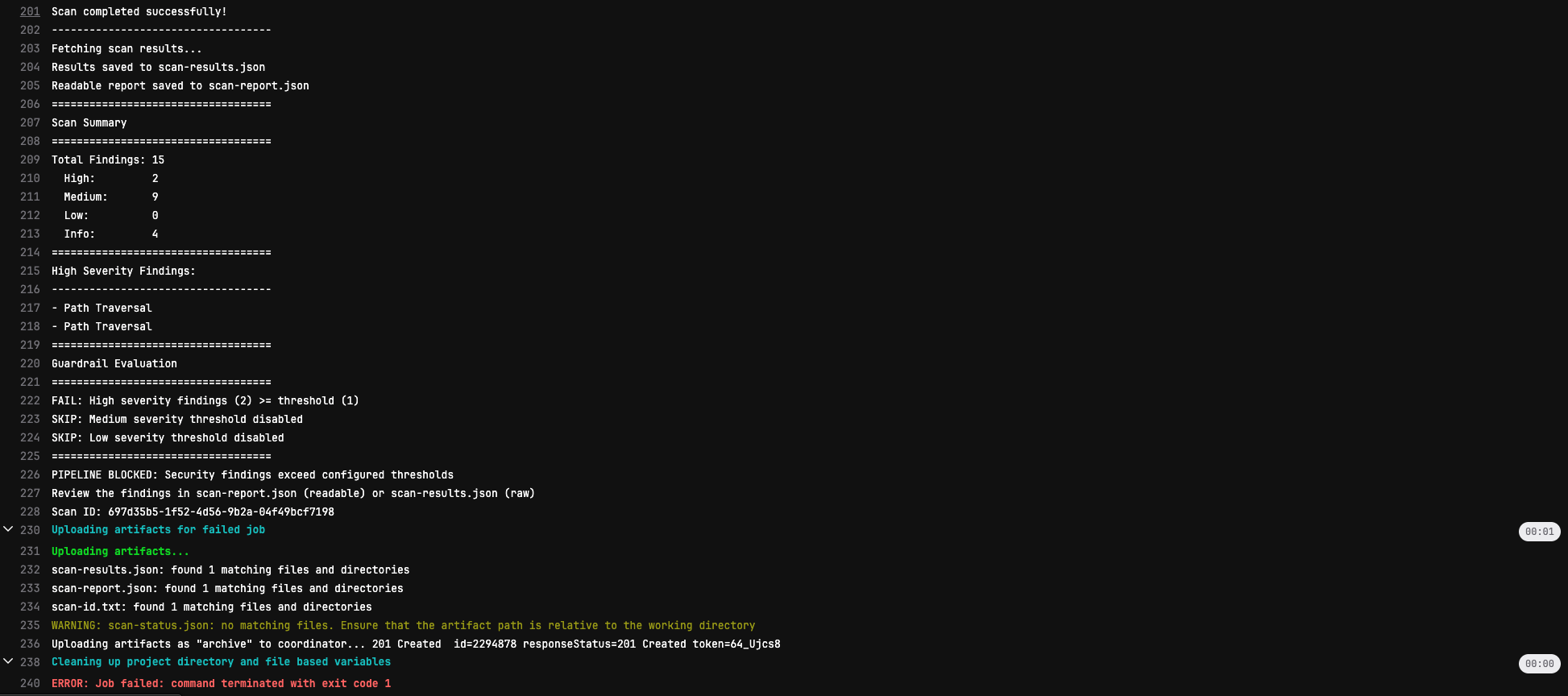
Pipeline blocked by guardrails
===================================
Guardrail Evaluation
===================================
FAIL: High severity findings (2) >= threshold (1)
SKIP: Medium severity threshold disabled
SKIP: Low severity threshold disabled
===================================

PIPELINE BLOCKED: Security findings exceed configured thresholds

Review the findings in scan-results.json
Scan ID: abc-123-def
Merge Request View
Blocked pipelines appear in the merge request UI:
Best Practices
Start with Monitoring
When first implementing, start with guardrails disabled to understand your baseline:
variables:
  FAIL_ON_HIGH: "0"
  FAIL_ON_MEDIUM: "0"
  FAIL_ON_LOW: "0"
Review scan results for a few weeks before enabling enforcement.
Gradual Enforcement
Roll out guardrails incrementally:
- Week 1-2: Monitoring only (thresholds at 0)
- Week 3-4: Block critical/high only (
FAIL_ON_HIGH: "1") - Month 2+: Tighten thresholds as you fix existing issues
Non-Blocking for Legacy Projects
For projects with existing technical debt:
security-scan:
  allow_failure: true
  # ... rest of configuration
This runs the scan and reports findings without blocking merges.
Different Policies per Branch
Use stricter policies for production branches:
security-scan-feature:
  extends: .security-scan-base
  variables:
    FAIL_ON_HIGH: "0"  # Monitoring only
  rules:
    - if: $CI_PIPELINE_SOURCE == "merge_request_event"

security-scan-main:
  extends: .security-scan-base
  variables:
    FAIL_ON_HIGH: "1"  # Block on high
  rules:
    - if: $CI_COMMIT_BRANCH == $CI_DEFAULT_BRANCH
Handling Blocked Pipelines
When a pipeline is blocked:
- Review the findings - Download
scan-results.jsonfrom artifacts - Assess the risk - Determine if findings are true positives
- Fix the issues - Address vulnerabilities in your code
- Re-run the pipeline - Push a new commit or retry the job
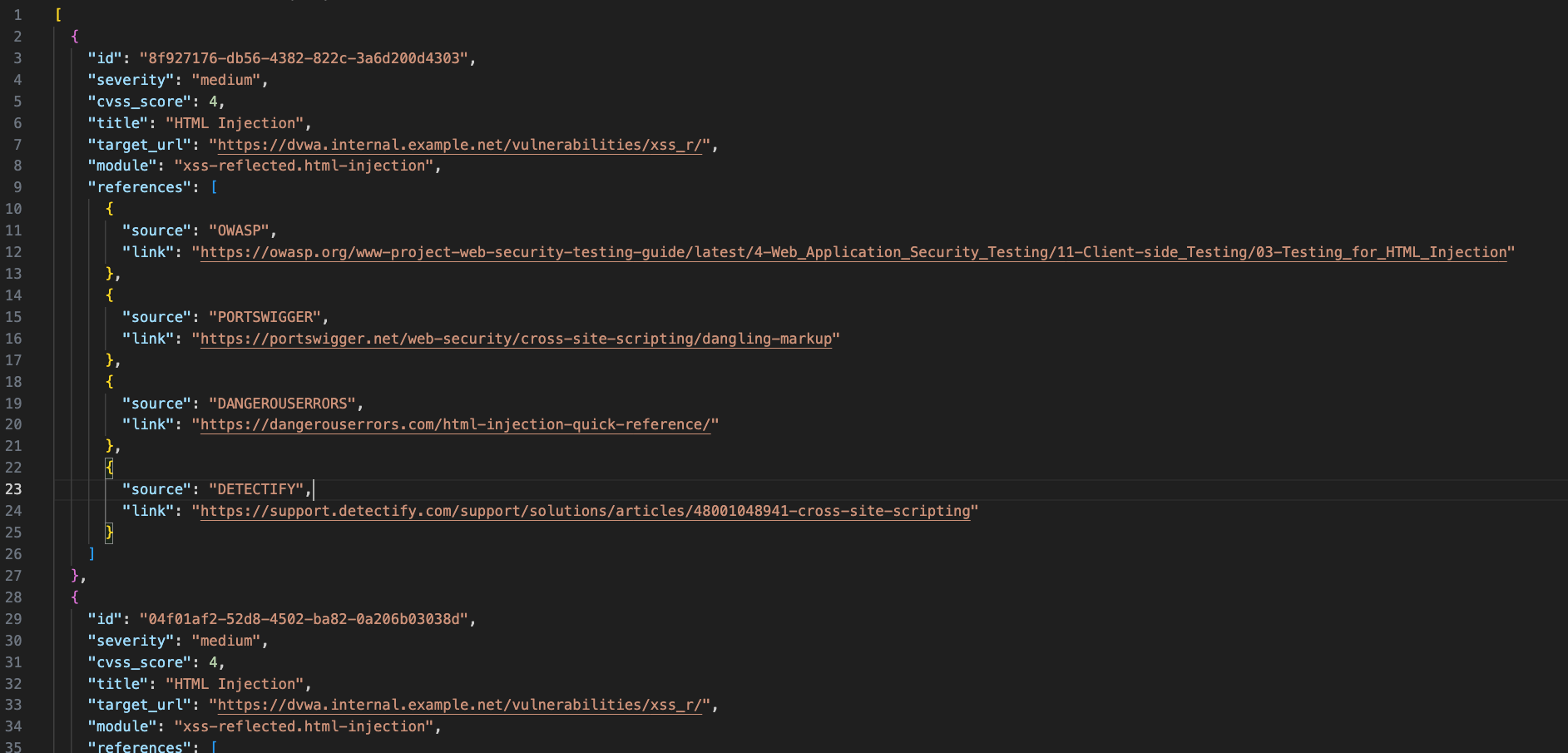
Scan results JSON with detailed findings
False Positives
If a finding is a false positive:
- Review the finding details in
scan-results.json - Mark as false positive in the Detectify platform
- Re-run the scan
Severity Levels
The scanner categorizes findings into severity levels:
| Severity | Description | Examples |
|---|---|---|
| High | Critical vulnerabilities requiring immediate attention | SQL injection, RCE, authentication bypass |
| Medium | Significant issues that should be addressed | XSS, CSRF, insecure configurations |
| Low | Minor issues with limited impact | Information disclosure, missing headers |
| Info | Informational findings (not counted in guardrails) | Version detection, technology fingerprinting |
Next Steps
- Configuration Reference - All available options
- Quick Start - Basic setup guide