GitLab CI/CD Integration
Integrate Detectify Internal Scanning into your GitLab pipelines to automatically scan your applications for vulnerabilities. Run scans on merge requests and pushes to the default branch, before releases, or on a schedule.
What You Can Do
- Scan merge requests and the default branch - Catch vulnerabilities early during development
- Scan release candidates - Validate staging deployments before promoting to production
- Enforce policies - Guardrails fail the pipeline when findings reach your thresholds. By default, one high severity finding fails it
See Use Cases for detailed workflow examples.
Prerequisites
- Internal Scanning Agent deployed and accessible from GitLab runners
- The scanner API exposed to your runners:
api_enabled = true(Terraform) oringress.enabled: true(Helm). Both are off by default. - An internal scan profile created for this agent in the Detectify platform (this represents the application you want to scan). See Detectify Configuration.
- GitLab project with CI/CD enabled
Important: The pipeline triggers a scan against a deployed application registered in Detectify, not your source code. Ensure the target application is running and accessible from your Internal Scanning Agent.
Quick Start
This example runs a security scan on merge requests and main branch pushes.
Step 1: Configure CI/CD Variables
In your GitLab project, navigate to Settings → CI/CD → Variables and add:
| Variable | Description | Options |
|---|---|---|
SCANNER_API_URL | Your Internal Scanning Agent endpoint URL | Required |
SCAN_PROFILE_TOKEN | Token for the scan profile (application) you want to scan | Required, Masked |
Tip: Mark
SCAN_PROFILE_TOKENas “Masked” to prevent it from appearing in job logs. The token is the last part of the scan profile’s URL in Detectify (/application-scanning/<token>).
Step 2: Add the Pipeline Configuration
Download the pipeline configuration and add it to your repository as .gitlab-ci.yml:
The configuration below shows the key structure. Download the file for the complete version with additional features.
View pipeline configuration
# Internal Security Scanner - GitLab CI/CD Integration
stages:
  - security-scan

variables:
  # Polling Configuration
  POLL_INTERVAL: "30"         # Seconds between status checks
  POLL_TIMEOUT: "14400"       # Max wait time (default: 4 hours)

  # Guardrail Thresholds - pipeline fails if findings >= threshold (0 = disabled)
  FAIL_ON_HIGH: "1"           # Block on any high severity finding
  FAIL_ON_MEDIUM: "0"         # Disabled by default
  FAIL_ON_LOW: "0"            # Disabled by default

security-scan:
  stage: security-scan
  timeout: 5h
  image: alpine:latest

  before_script:
    - apk add --no-cache curl jq

  script:
    - |
      set -e

      # Validate required variables
      [ -z "$SCANNER_API_URL" ] && echo "ERROR: SCANNER_API_URL not set" && exit 1
      [ -z "$SCAN_PROFILE_TOKEN" ] && echo "ERROR: SCAN_PROFILE_TOKEN not set" && exit 1

      # Health check
      echo "Checking scanner availability..."
      HEALTH=$(curl -s -o /dev/null -w "%{http_code}" "${SCANNER_API_URL}/health")
      [ "$HEALTH" != "200" ] && echo "ERROR: Scanner not reachable" && exit 1

      # Start scan
      RESPONSE=$(curl -s -X POST "${SCANNER_API_URL}/scans" \
        -H "Content-Type: application/json" \
        -d "{\"scan_profile_token\": \"${SCAN_PROFILE_TOKEN}\"}")
      SCAN_ID=$(echo "$RESPONSE" | jq -r '.scan_id')
      echo "Scan ID: $SCAN_ID"

      # Poll for completion (simplified - see full file for complete implementation)
      # ... polling logic ...

      # Get results and apply guardrails
      RESULTS=$(curl -s "${SCANNER_API_URL}/scans/${SCAN_ID}/results")
      echo "$RESULTS" | jq '.' > scan-results.json

      # Count and evaluate findings against thresholds
      # ... guardrail logic ...

  artifacts:
    when: always
    paths:
      - scan-results.json
      - scan-report.json
      - scan-id.txt
      - scan-status.json
    expire_in: 30 days

  rules:
    - if: $CI_PIPELINE_SOURCE == "merge_request_event"
    - if: $CI_COMMIT_BRANCH == $CI_DEFAULT_BRANCH
    - if: $CI_PIPELINE_SOURCE == "web"
      when: manual
Step 3: Commit and Run
Commit the .gitlab-ci.yml file to your repository. The pipeline will automatically run on:
- Merge requests
- Pushes to the default branch
- Manual triggers from the GitLab UI
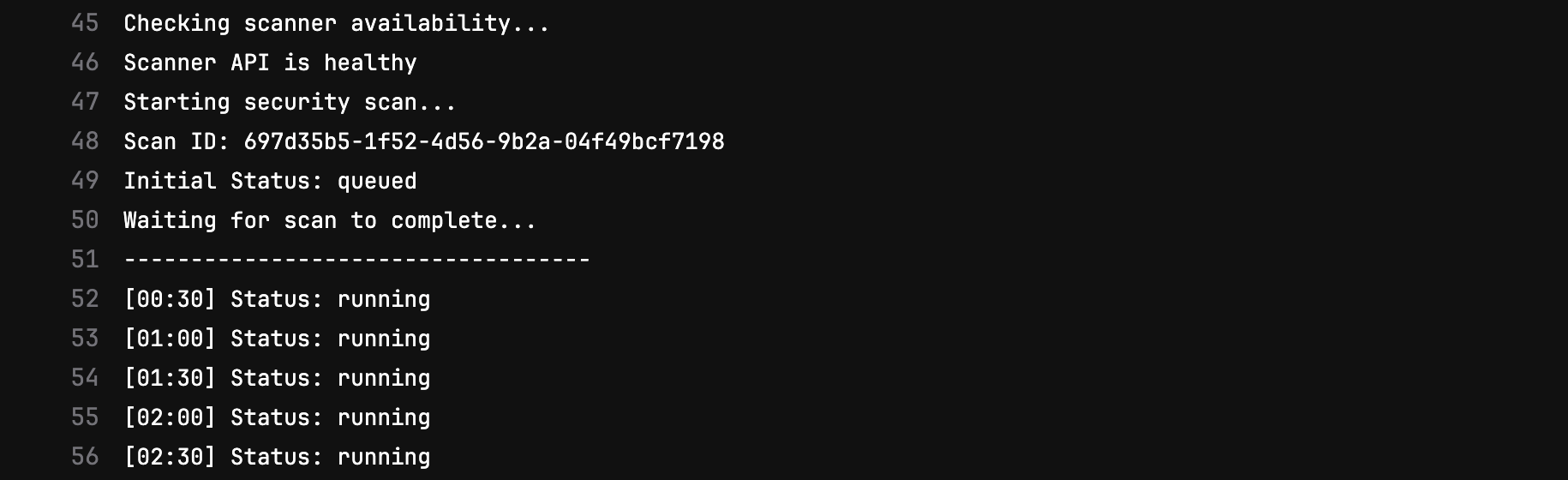
Pipeline running in GitLab
Viewing Results
Pipeline Output
The scan job logs show real-time progress and a summary of findings:
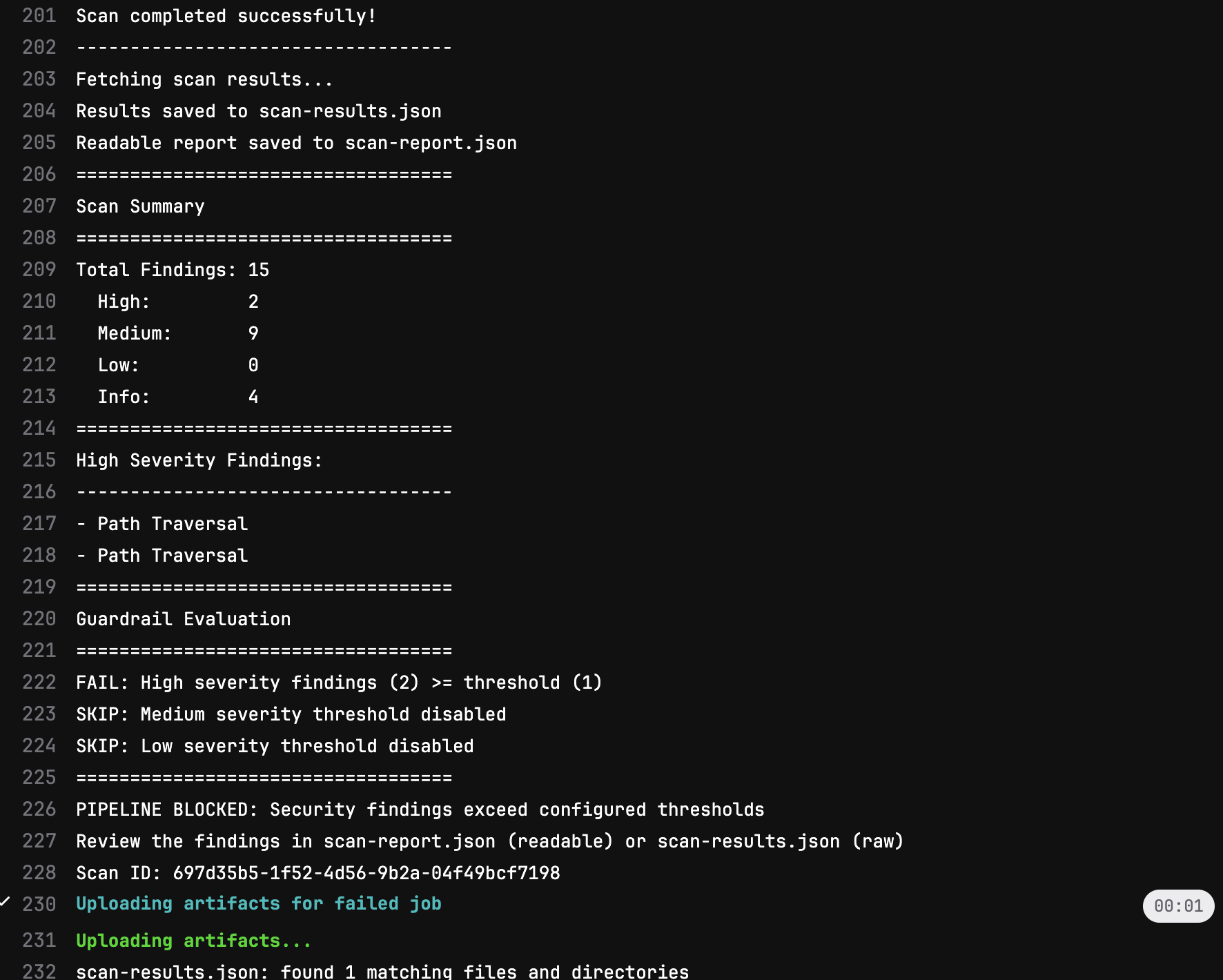
Scan results in job output
Artifacts
Scan results are saved as pipeline artifacts for later review:
| Artifact | Description |
|---|---|
scan-results.json | Full scan results in JSON format |
scan-report.json | Readable report of the findings |
scan-id.txt | Scan ID for reference in Detectify platform |
scan-status.json | Final scan status (on failure) |
Next Steps
- Use Cases - Different workflows (merge requests, release candidates, scheduled)
- Configuration Reference - Customize polling, timeouts, and more
- Guardrails - Set the thresholds that fail the pipeline