Use Cases
The Internal Scanning Agent supports two use cases: scheduled scans of internal applications, and scans triggered from your CI/CD pipeline.
Internal Scanning
Scan web applications inside your private network without opening your firewall to external scanners.
How It Works
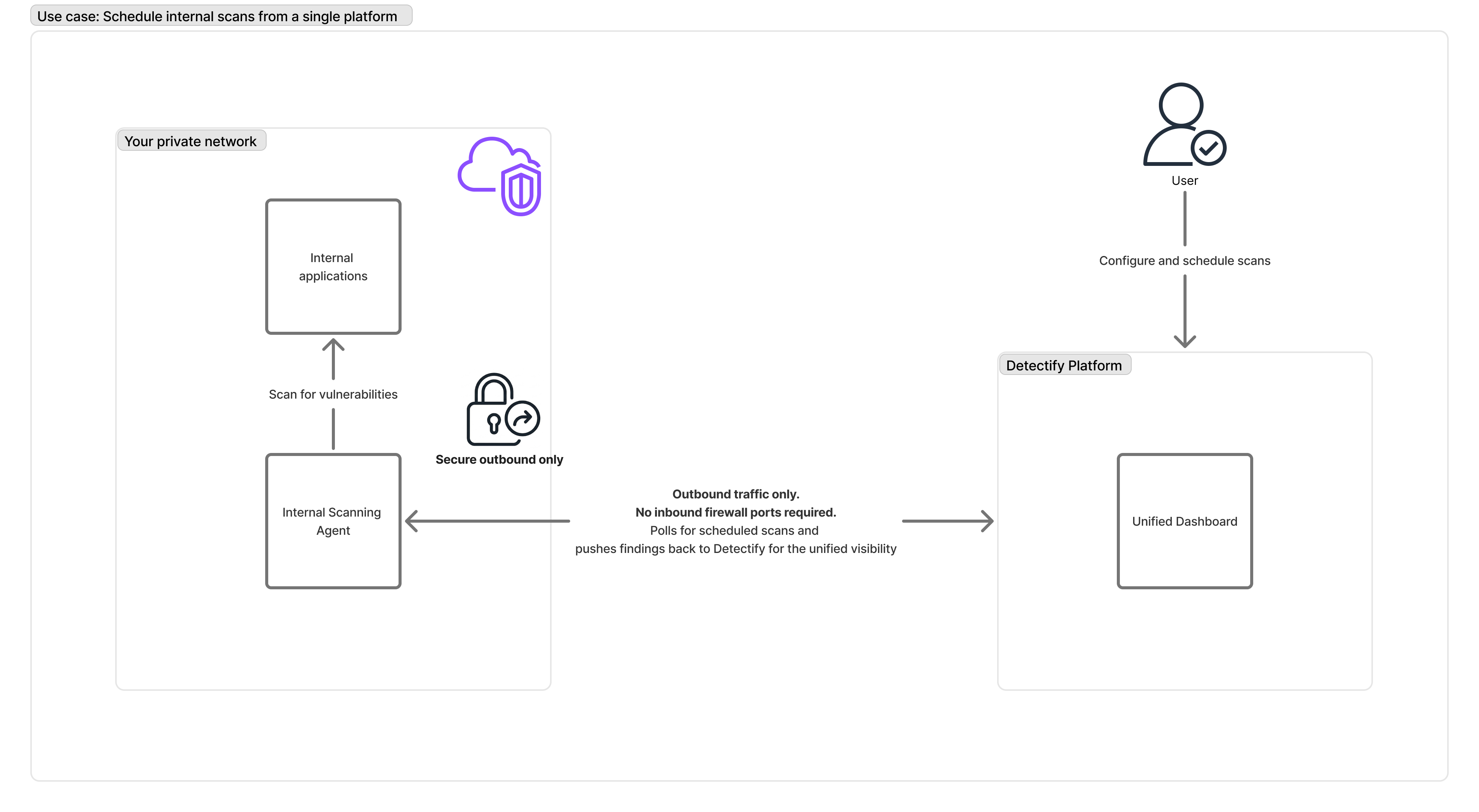
- Deploy the agent in the same network as the applications to scan, or in a network that has access to them
- Configure scan targets and schedules through the Detectify Platform UI
- Agent polls Detectify Platform for scheduled scans and configuration settings
- Scanner executes scans against your internal applications when scheduled
- Findings are pushed to Detectify Platform and displayed in the unified dashboard
Benefits
| Benefit | Description |
|---|---|
| No firewall changes | The scanner initiates all connections outbound - no inbound rules required |
| Unified visibility | View internal and external scan results in a single dashboard |
| Distinguish attack surfaces | Findings show their scan source, Internal Scanning, in the UI |
| Payload-based tests | The agent runs a subset of Application Scanning’s payload-based tests. CVE tests for fingerprinted technologies, subdomain takeover and asset discovery don’t run in the agent |
| Centralized management | Configure, schedule, and manage all scans from the Detectify platform |
Typical Environments
- Internal APIs and microservices
- Admin panels and back-office applications
- Staging environments that mirror production
- Applications in private VPCs or on-premises data centers
Pre-Production Pipeline Scanning
Integrate vulnerability scanning into your CI/CD pipeline to catch security issues before they reach production.
How It Works
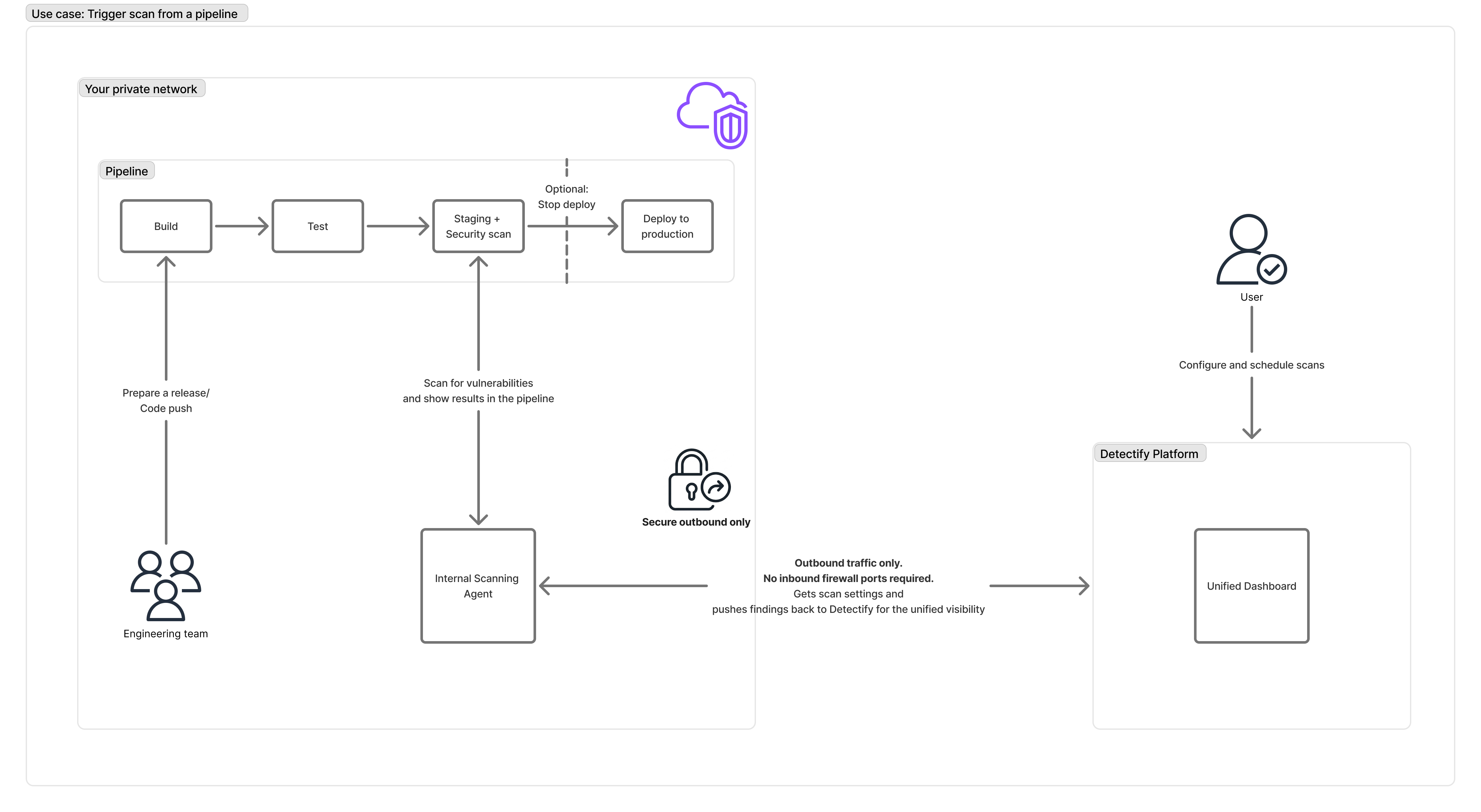
- Set up the Internal Scanning Agent in your pre-production environment
- Trigger scans from your CI/CD pipeline when deploying to staging
- Scanner executes DAST tests against your staged application
- Results are sent to both destinations:
- Detectify Platform - for centralized visibility, tracking, and reporting
- CI/CD Pipeline - for immediate developer feedback and deployment gates
- Pass/fail gates can block deployment when the count of high, medium or low findings reaches your threshold
Benefits
| Benefit | Description |
|---|---|
| Shift-left security | Find vulnerabilities before they reach production |
| Fast feedback loop | Developers get scan results directly in the pipeline |
| Centralized results | All findings are still visible in Detectify UI for tracking |
| Automated quality gates | Block deployments based on vulnerability severity |
| Consistent testing | Every deployment gets the same security checks |
Integration Guides
Ready to set up CI/CD integration? See our detailed guides:
- GitLab CI/CD - Complete setup guide with examples
Or see the CI/CD Integrations overview for all options.
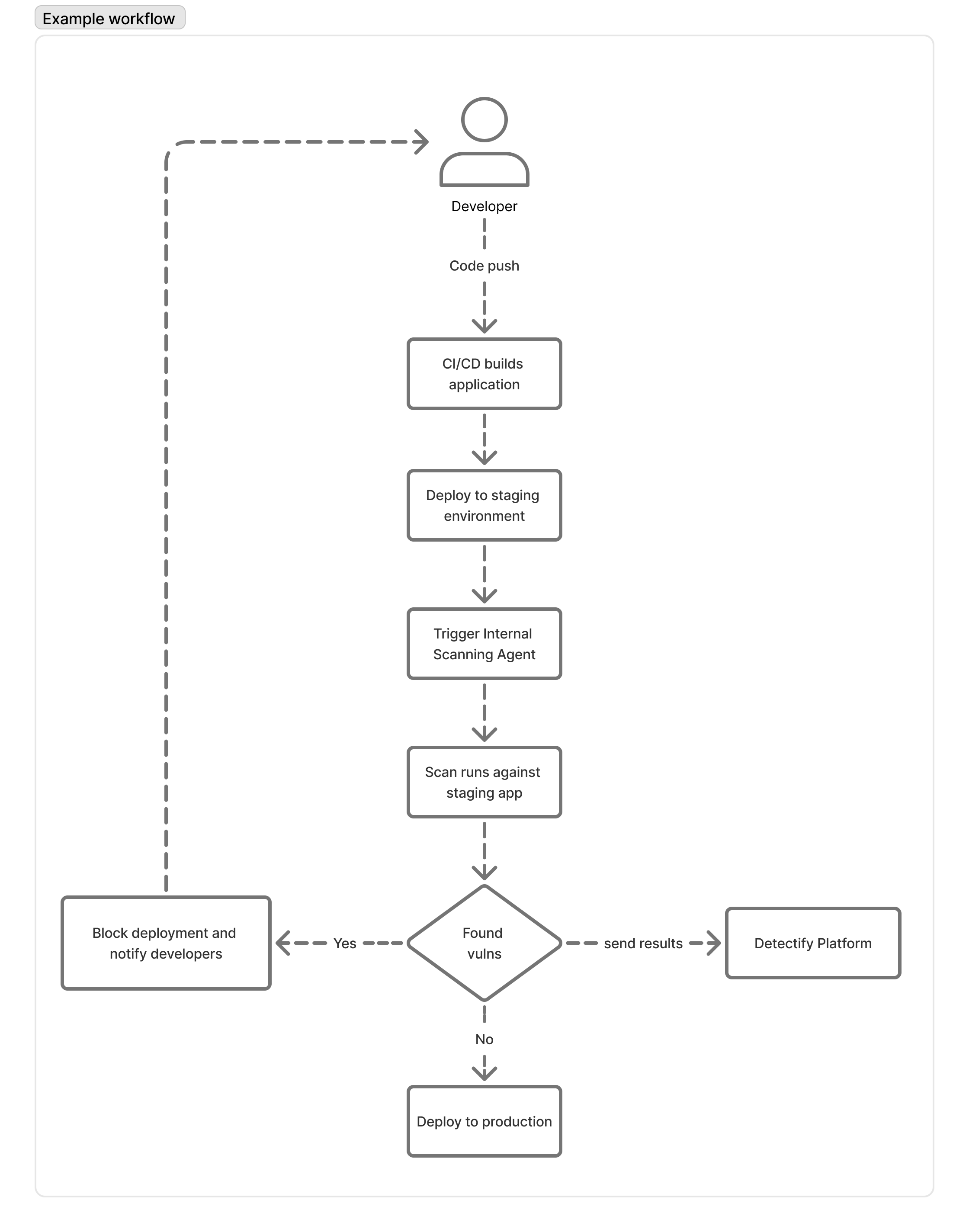
Example Workflow
Multiple Agents
You can deploy multiple Internal Scanning Agents across different networks or environments. All agents report to the same Detectify Platform, giving you:
- Unified visibility - Results from all agents appear in one dashboard
- Network isolation - Each agent scans only the networks it can access
- Regional coverage - Deploy agents in different data centers or cloud regions
- Environment separation - Separate agents for development, staging, and production
This applies to both use cases - whether you’re scanning internal networks or integrating with CI/CD pipelines, you can run several agents and see all their results in one place.
Multi-tenant deployments
You can run one scanner per team, tenant, or environment. The Helm chart and the Terraform module install into any namespace:
- Helm: pass
helm -n <namespace>at install time. Use a different release name in each namespace, because the chart’s PriorityClass is cluster-scoped and named after the release. Enable bundled Vault in at most one release per cluster. - Terraform (AWS): set
var.namespaceon the module, one deployment per tenant.
Pair that with bring-your-own Secrets so each tenant’s credentials stay isolated. See the Helm Secrets Management guide for the patterns.
Comparing Use Cases
| Aspect | Internal Scanning | Pipeline Scanning |
|---|---|---|
| Primary goal | Ongoing security monitoring | Pre-deployment validation |
| Scan trigger | Scheduled via Detectify UI | Triggered by CI/CD pipeline |
| Results destination | Detectify Platform | Detectify Platform + CI/CD pipeline |
| Feedback speed | Results available in Detectify | Immediate pipeline feedback + Detectify |
| Target environment | Production-like internal apps | Staging/pre-production |
| Typical frequency | Daily/weekly scheduled scans | Every deployment |
Getting Started
Both use cases use the same Internal Scanning Agent. Choose your path:
- Deploy - Pick a platform and see its infrastructure prerequisites
- Detectify Configuration - Configure scan targets in the Detectify UI
- CI/CD Integrations - Set up pipeline-triggered scans