Guardrails
Guardrails are thresholds that fail the pipeline when findings reach them. Use them to enforce security standards and prevent vulnerable code from being deployed.
Note: By default the pipeline fails on one or more high severity findings. Set all thresholds to
0to run scans without enforcement and review the results manually.
How Guardrails Work
After a scan completes, the pipeline:
- Counts findings by severity (high, medium, low). Critical and information findings are not counted
- Compares each count against your configured thresholds
- Fails the pipeline if any count reaches its threshold
- Passes if all findings are within acceptable limits
Running Without Guardrails
Set all three thresholds to 0 to run without guardrails. The pipeline then passes regardless of findings. The scan still runs and results are saved as artifacts for manual review.
variables:
  FAIL_ON_HIGH: "0"    # Disabled - pipeline won't fail
  FAIL_ON_MEDIUM: "0"  # Disabled
  FAIL_ON_LOW: "0"     # Disabled
This is useful when:
- You’re first integrating scanning and want to understand your baseline
- You prefer manual review over automated enforcement
- You want scan results without blocking deployments
Configuring Thresholds
Set thresholds using CI/CD variables:
| Variable | Default | Behavior |
|---|---|---|
FAIL_ON_HIGH | 1 | Fail if high severity findings ≥ 1 |
FAIL_ON_MEDIUM | 0 | Disabled (won’t fail on medium) |
FAIL_ON_LOW | 0 | Disabled (won’t fail on low) |
Examples
Block Any High Severity Finding (Default)
variables:
  FAIL_ON_HIGH: "1"
  FAIL_ON_MEDIUM: "0"
  FAIL_ON_LOW: "0"
Pipeline fails if 1 or more high severity findings are detected.
Strict Policy - Block on High and Medium
variables:
  FAIL_ON_HIGH: "1"
  FAIL_ON_MEDIUM: "1"
  FAIL_ON_LOW: "0"
Pipeline fails if any high or medium severity finding is detected. Critical findings aren’t counted (see Severity Levels).
Allow Some Findings (Grace Period)
variables:
  FAIL_ON_HIGH: "3"
  FAIL_ON_MEDIUM: "10"
  FAIL_ON_LOW: "0"
Pipeline allows up to 2 high and 9 medium severity findings before failing.
Monitoring Only (No Blocking)
variables:
  FAIL_ON_HIGH: "0"
  FAIL_ON_MEDIUM: "0"
  FAIL_ON_LOW: "0"
Pipeline always passes. Use this to monitor scan results without enforcement.
Pipeline Output
Passing Pipeline
When all guardrails pass, you’ll see:
===================================
Guardrail Evaluation
===================================
PASS: High severity findings (0) < threshold (1)
SKIP: Medium severity threshold disabled
SKIP: Low severity threshold disabled
===================================

PIPELINE PASSED: All security guardrails satisfied
Failing Pipeline
When a guardrail is triggered:
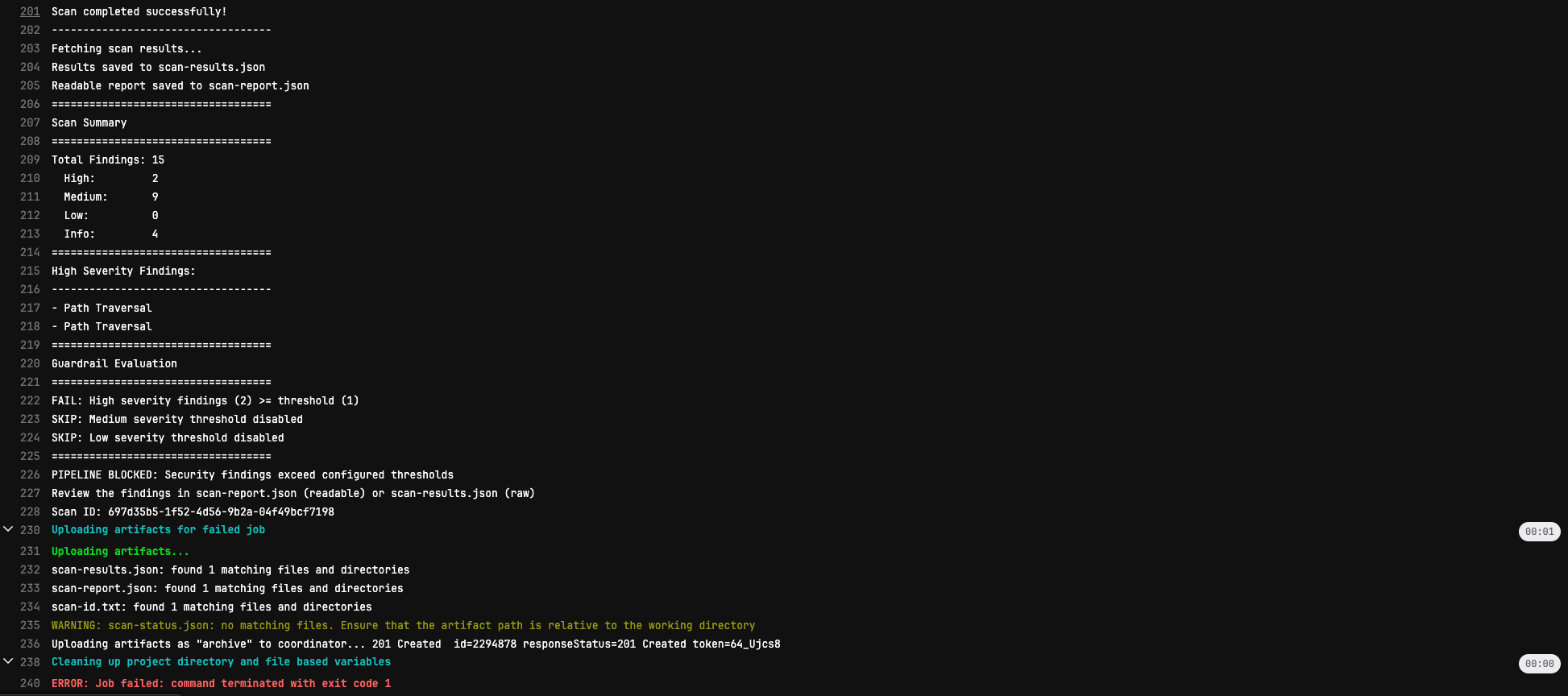
Pipeline blocked by guardrails
===================================
Guardrail Evaluation
===================================
FAIL: High severity findings (2) >= threshold (1)
SKIP: Medium severity threshold disabled
SKIP: Low severity threshold disabled
===================================

PIPELINE BLOCKED: Security findings exceed configured thresholds

Review the findings in scan-report.json (readable) or scan-results.json (raw)
Scan ID: abc-123-def
Best Practices
Start with Monitoring
When first implementing, start with guardrails disabled to understand your baseline:
variables:
  FAIL_ON_HIGH: "0"
  FAIL_ON_MEDIUM: "0"
  FAIL_ON_LOW: "0"
Review scan results for a few weeks before enabling enforcement.
Gradual Enforcement
Roll out guardrails incrementally:
- Week 1-2: Monitoring only (thresholds at 0)
- Week 3-4: Block high only (
FAIL_ON_HIGH: "1") - Month 2+: Tighten thresholds as you fix existing issues
Non-Blocking for Legacy Projects
For projects with existing technical debt:
security-scan:
  allow_failure: true
  # ... rest of configuration
This runs the scan and reports findings without blocking merges.
Different Policies per Branch
Use stricter policies for production branches:
# Stop the template's own security-scan job, so only the jobs below run
security-scan:
  rules:
    - when: never

security-scan-feature:
  extends: security-scan
  variables:
    FAIL_ON_HIGH: "0"  # Monitoring only
  rules:
    - if: $CI_PIPELINE_SOURCE == "merge_request_event"

security-scan-main:
  extends: security-scan
  variables:
    FAIL_ON_HIGH: "1"  # Block on high
  rules:
    - if: $CI_COMMIT_BRANCH == $CI_DEFAULT_BRANCH
Handling Blocked Pipelines
When a pipeline is blocked:
- Review the findings - Download
scan-results.jsonfrom artifacts - Assess the risk - Determine if findings are true positives
- Fix the issues - Address vulnerabilities in your code
- Re-run the pipeline - Push a new commit or retry the job
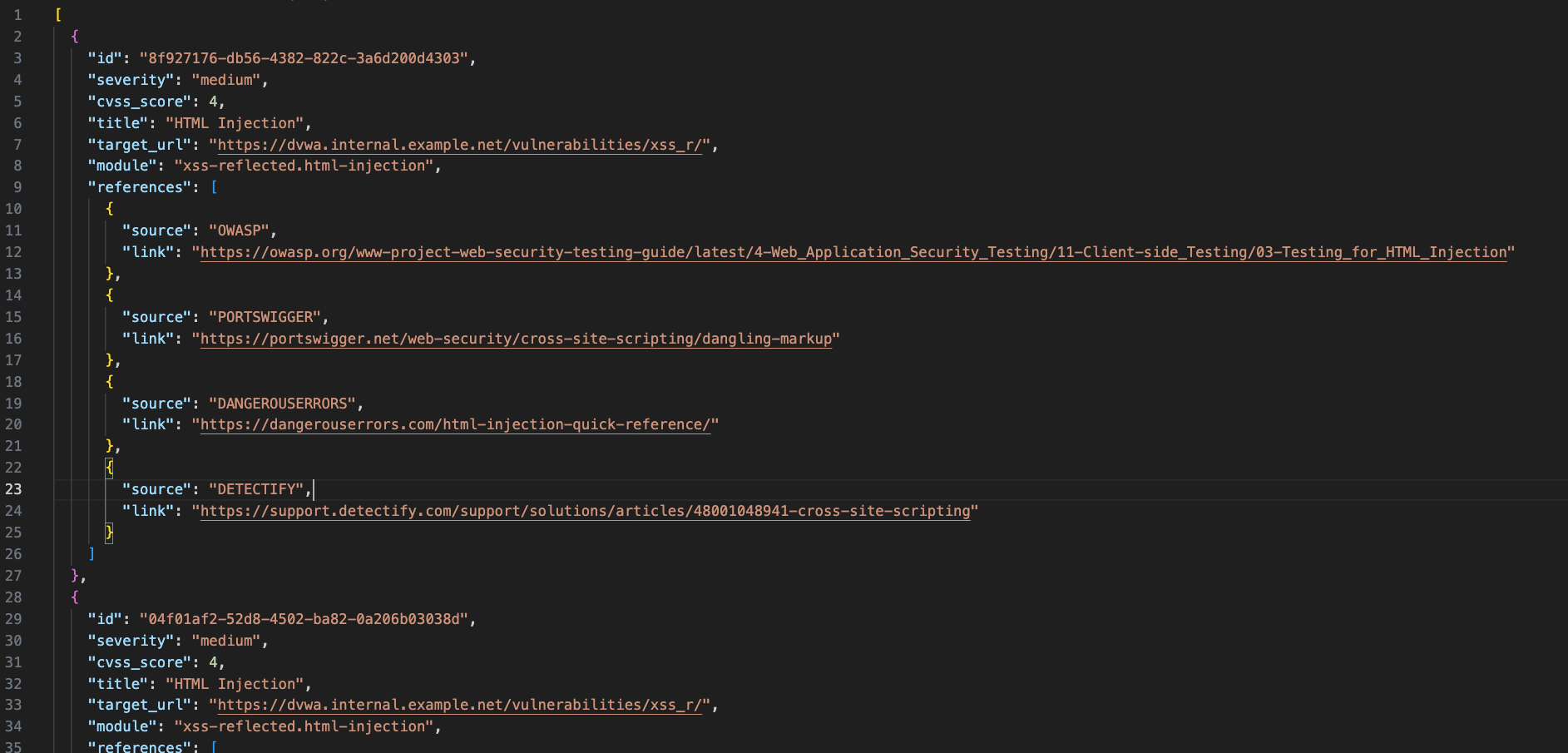
Scan results JSON with detailed findings
False Positives
The guardrails count every finding the scan returns, including false positives. Review each finding’s details in scan-results.json.
Severity Levels
Findings carry one of five severity levels. The pipeline counts three of them:
| Severity | Guardrail threshold |
|---|---|
| Critical | Not counted |
| High | FAIL_ON_HIGH |
| Medium | FAIL_ON_MEDIUM |
| Low | FAIL_ON_LOW |
| Information | Not counted |
Next Steps
- Configuration Reference - All available options
- Quick Start - Basic setup guide